


Instagram Enhances Direct Messaging with New Features
Instagram is improving its direct messaging (DM) functionality by introducing various new features to make conversations more engaging and user-friendly. The latest update, available for iOS and Android users first (with web access anticipated soon), includes features such as message translation, music sharing, and more. These upgrades aim to make Instagram’s messaging service more competitive against alternatives like Apple’s iMessage and other apps.
Instant Message Translation on Instagram
Instagram now offers instant message translation within DMs, effectively eliminating language barriers and enhancing global conversations. Users can easily press and hold a sent or received message in a different language and tap “Translate” to see the translated text directly beneath the original message. At its launch, this feature supports 99 languages.
Music Sharing with Stickers on Instagram
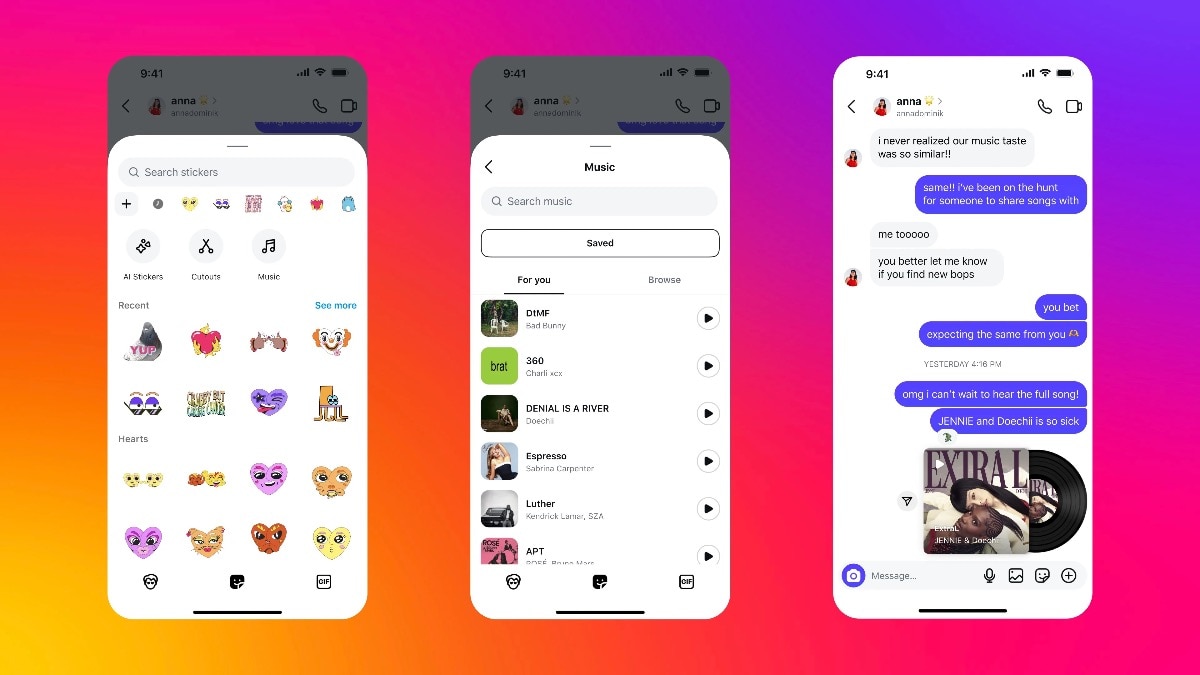
A music-sharing feature has been introduced, allowing users to send a 30-second preview of any song from Instagram’s music library in group chats or broadcast channels. To share a song, users simply tap the sticker button in the chat composer, select “Music,” find their preferred track, and send it. This feature has been rolled out with the support of global celebrities Jennie and Doechii, aiming to help users discover new music while enabling artists to connect with their audience.
Scheduled Messaging on Instagram
Instagram users can now schedule messages, a feature reminiscent of Apple’s iMessage. A user can draft a message, long-press the ‘Send’ button, and select a specific date and time for the message to be sent. Users are allowed to schedule messages up to 29 days in advance, facilitating better organisation and timely communication.
Pinned Content in Chats on Instagram
Users now have the ability to pin essential messages, images, memes, or reels at the top of a chat for easy access. To pin a message, users just need to long-press it and select “Pin.” Instagram permits up to three pinned messages per conversation, and these can be unpinned at any time by tapping on them again.
QR Code Invites for Group Chats on Instagram
To simplify the process of expanding group conversations, Instagram has launched QR code invites for group chats. Users can easily generate a QR code by tapping the group name at the top of a chat, selecting “Invite Link,” and then choosing “QR Code.” This code can be shared live, via a share sheet, or saved to the camera roll for future use.