


“`html
JioPC: Transforming Your Jio Set-Top Box into a Cloud-Based Computer
Reliance Jio chairman Akash Ambani introduced JioPC on August 29, a groundbreaking service that converts a Jio set-top box into a versatile, cloud-powered personal computer. During Reliance Industries’ annual general meeting, Akash Ambani showcased JioPC, which upgrades a standard television or screen into an all-encompassing, AI-capable system.
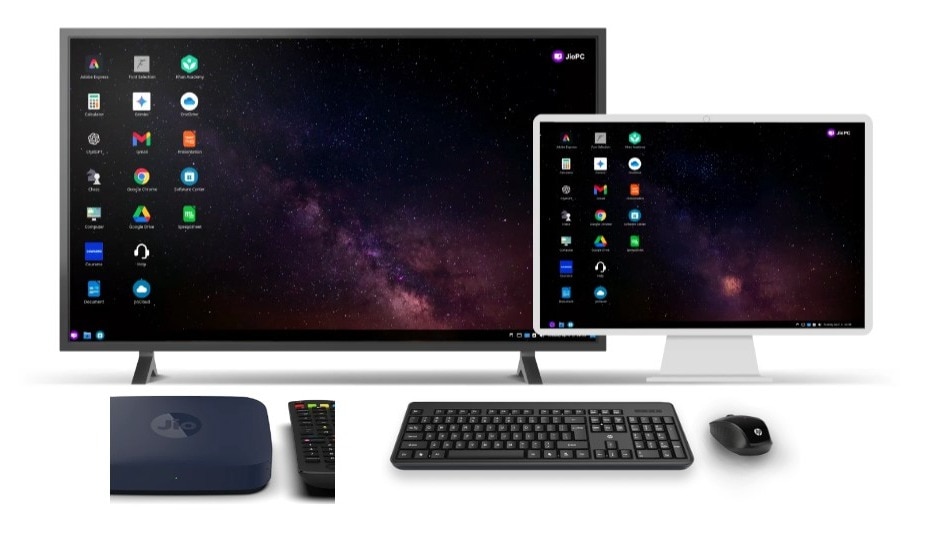
Picture this: rather than investing substantial amounts on a laptop or desktop, users can simply connect a keyboard to their Jio Set-Top Box and immediately transform their television into a computing device. All the demanding tasks—like processing power, storage, and system updates—are managed by Jio’s cloud infrastructure. This alleviates concerns about costly hardware upgrades, sluggish systems, or obsolete software. With JioPC, scalability is possible remotely; users pay solely for what they consume, and their virtual computer adapts to meet their evolving requirements.
Ambani described it as a “leap forward,” emphasising that JioPC is not merely about providing access to a computer, but rather equipping individuals with AI-ready capabilities that have traditionally been available only to a select few. By capitalising on its extensive base of over 500 million telecom subscribers and leveraging its 5G advancements, JioPC aspires to make computing accessible for households, educational institutions, and small enterprises throughout India.
Ambani highlighted that JioPC is an innovative product that changes your TV or any screen into a comprehensive, AI-ready computer. Users can effortlessly start by connecting a keyboard to their Jio Set-Top Box. In an instant, they gain access to a cloud-powered virtual computer with zero upfront costs—payment is based entirely on usage. As JioPC is hosted in the cloud, it remains secure, consistently updated, and users can upgrade their memory, storage, and computing capabilities remotely as their requirements grow.
Features of JioPC
The device operates on Ubuntu (Linux), an open-source operating system known for its security and efficiency. Included in the package is LibreOffice, which provides users with essential tools for word processing, spreadsheets, and presentation creation. For those who are accustomed to more familiar software, Microsoft Office is readily accessible via the web browser.
Each subscription to JioPC is equipped with a quad-core processor, 8GB of RAM, 100GB of storage, and unlimited usage—sufficient for everyday tasks such as web browsing, programming, design work, online classes, and operating productivity applications. As a cloud-based solution, users will never have to contend with viruses, outdated software, or insufficient storage. Everything remains secure, continuously updated, and can be expanded with just a few actions.
To utilise JioPC, users need a Jio Set-Top Box, a reliable internet connection, and a USB or Bluetooth-compatible keyboard and mouse.
Subscription Plans and Pricing
JioPC is offered not as conventional hardware, but as a subscription-based service. Initially, Reliance is rolling out access via invitations, along with a complimentary trial for early users. After the trial concludes, users can select from the following flexible plans:
- 1 month plan – Unlimited usage for Rs 599
- 2 months plan – Unlimited usage for Rs 999
- 6 months + 2 months free – Unlimited usage for Rs 2,499
- 12 months + 3 months free – Unlimited usage for Rs 4,599
This approach minimises upfront costs, making it easier for families, students, and professionals who may find it challenging to invest in a personal computer.
How to Use JioPC
Getting started with JioPC is straightforward. Just follow these steps:
- Turn on your TV and Jio Set-Top Box – Navigate to the apps section and launch the JioPC app.
- Connect your keyboard and mouse – Attach a USB or Bluetooth-enabled keyboard and mouse to the Set-Top Box. (The JioPC website also provides recommendations for compatible keyboard-mouse combinations.)
- Set up your JioPC account – Input personal details to create your account, then select Continue.
- Launch JioPC – Finally, click “Launch Now” to access your virtual desktop.
“`