


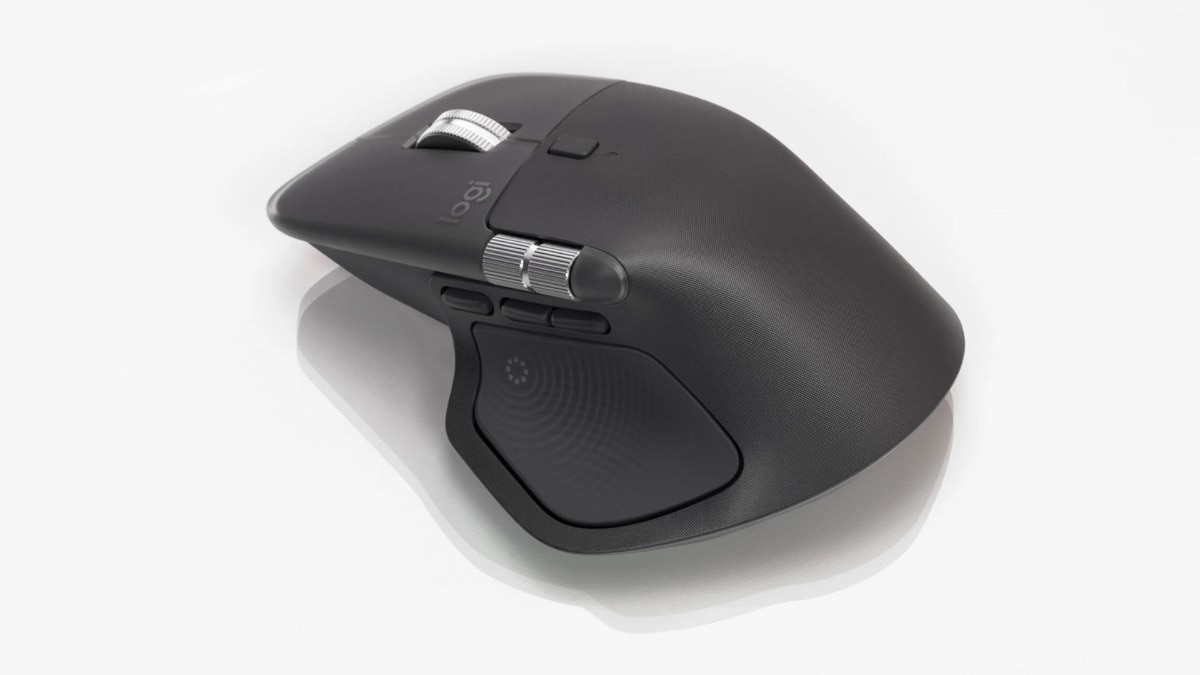
Logitech MX Master 4: The Ultimate Productivity Mouse
There are gadgets one admires, and then there are those that seamlessly integrate into daily life. The Logitech MX Master 4 belongs firmly in the latter category. After extensive use across long writing sessions, photo editing, spreadsheet tasks, and the occasional late-night rush, it becomes evident that this mouse isn’t about flashy features. Instead, it’s designed for seamless flow.
Design: Familiar Yet Polished
At first sight, the MX Master 4 appears to be more of an evolution than a groundbreaking redesign. This is precisely the intention. Logitech has resisted the urge to modify what was already effective, instead refining aspects both literally and metaphorically.
The sculpted shape tailored for right-handed users continues to be among the best available. It cradles the palm comfortably, supports the thumb intuitively, and avoids the awkward angles that often trouble so-called productivity mice. The rubber grip has been simplified, mostly appearing on the right side and thumb rest, giving the mouse a sleek appearance while maintaining excellent control.
Button placement has seen subtle improvements. The primary buttons feel more expansive and forgiving, while the side buttons are easier to find without taking your eyes off the screen. Everything is positioned where fingers naturally rest, a simplicity that is surprisingly uncommon.
Exclusion for Left-Handed Users
Unfortunately, left-handed individuals still face limitations. This mouse is designed exclusively for right-handed use, and this oversight becomes increasingly noticeable with each new release.
The Quietest Clicks
For those working in shared environments or who appreciate a serene workspace, the clicks of the MX Master 4 are a delight. Logitech has managed to make them even quieter than previous models. They are soft yet precise, offering a sound that blends seamlessly into the background noise, which is ideal when deeply engaged in work.
The MagSpeed scroll wheel makes a return and remains one of the compelling reasons to choose this mouse. Users can effortlessly scroll through hundreds of lines, then switch to precise, tactile control with a simple press. The side scroll wheel has been made more accessible, making horizontal navigation in timelines and spreadsheets genuinely functional rather than merely a gimmick.
Haptics with Purpose
The standout upgrade this time is the introduction of haptic feedback, a feature that could have easily been mishandled. Fortunately, Logitech has adopted a measured approach. Haptics are not designed to impress but to confirm user intention.
Users receive gentle feedback during mode changes, when activating certain shortcuts, or while interacting with app-specific controls. The feedback settings are adjustable in both strength and function and can be completely turned off if preferred. In practice, a medium setting provides an ideal balance between being aware and avoiding distractions.
There are battery implications for this feature, but they are manageable. Even with haptics active, the mouse can last through several workdays. Switching them off entirely eliminates any concerns about battery life.
Gesture Button and Action Ring: Efficiency Without Clutter
Two new functionalities underscore the MX Master 4’s productivity emphasis. The gesture button allows for directional shortcut commands. By holding it down and moving the mouse, users can quickly access options such as showing the desktop, opening task views, or switching applications. Once familiar, it becomes quicker than reaching for the keyboard.
The Action Ring is a radial menu that appears on-screen when the dedicated button on the thumb wing is pressed. From this menu, users can quickly select shortcuts, tools, or even nested options. While it may sound complex, it is surprisingly intuitive, especially after personalisation.
The compelling aspect of this system is its context-awareness. With app-specific profiles, the same gesture or menu direction can perform different actions depending on the software being used. Activities such as video editing, spreadsheet management, or switching chats each benefit distinctively.
The downside is that the full functionality is heavily reliant on Logitech’s software.
Logi Options Plus: Essential Utility
To unlock the MX Master 4’s complete capabilities, users will need Logi Options Plus. Thankfully, this remains one of the more effective peripheral utilities available. The interface is user-friendly, profile management is straightforward, and advanced features are cleverly organised without being hidden.
Smart Actions allow for task chaining, while AI-driven tools assist in automating text prompts and repetitive tasks. While not every feature integrates with the Action Ring yet, this feels like a missed opportunity, but the platform has a strong foundation.
Plug-ins may still be limited, although the list continues to grow. Creative and professional applications gain the most from this, and one can easily envision this ecosystem evolving into something more robust.
Connectivity and Daily Dependability
The MX Master 4 connects either via Bluetooth or Logitech’s Bolt receiver, with swift and reliable device switching. It functions across Windows, macOS, Linux, ChromeOS, tablets, and even smartphones. Logitech’s Flow feature remains an impressive way to transfer files and text between computers, particularly in mixed operating system environments.
One persistent drawback is the absence of a storage slot for the USB dongle and the lack of a cable included in the package. While these are minor imperfections, they do stand out at this price point.
Target Audience
The MX Master 4 is not aimed at casual users or gamers seeking ultra-fast response rates. This mouse is designed for individuals who spend extended hours at their desks and prioritise efficiency, comfort, and memory muscle.
If daily tasks include writing, editing, coding, designing, analysing, or managing, this mouse quickly proves its worth. Compared to the MX Master 3S, the enhancements may seem slight but are meaningful. Over time, they culminate in a significantly smoother user experience.
The Logitech MX Master 4 does not boast loudly about its enhancements. Instead, it allows users to focus on their tasks, enhancing productivity. This is its key strength. It refines an already outstanding concept with quieter clicks, advanced controls, and enhanced customisation, all while maintaining the comfort and reliability that made the series well-regarded.
Priced at ₹15,995, it may feel expensive for a mouse, but for those who truly need it, every rupee spent is justified. Once integrated into a workflow, replacing it becomes nearly inconceivable.