


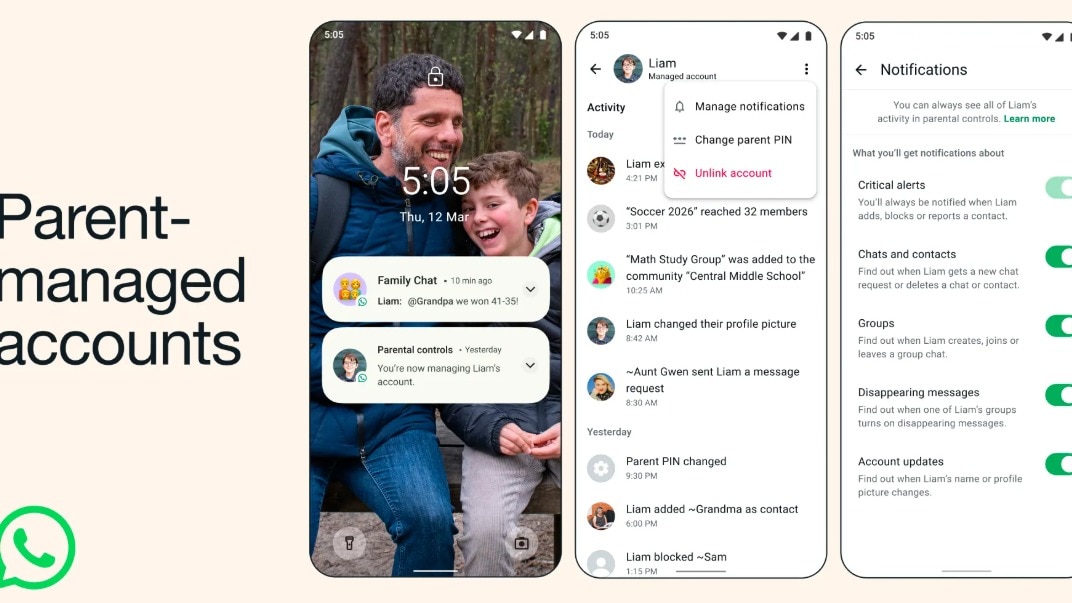
WhatsApp is introducing new safety features designed specifically for its young users. The instant messaging platform is launching parent-managed accounts for children under 13, enabling parents to monitor their pre-teens’ usage of the app while ensuring messaging features remain fully functional and the conversations private and secured with end-to-end encryption.
WhatsApp Parent-Managed Accounts: Important Features
The latest privacy update includes a range of parental controls that provide significant oversight over a child’s activities and usage patterns on the app.
Parental Controls and Oversight
Parents will have the ability to manage whom their child can contact, dictate which groups they are allowed to join, and review message requests from unfamiliar users. This feature empowers parents to carefully manage who can communicate with their child.
Secure Access with a Parent PIN
There is also a specific six-digit parent PIN designed to prevent children from accessing account settings, allowing parents to modify privacy settings or adjust communication permissions effectively.
End-to-End Encryption Maintained
Despite the parental involvement, all chats will remain end-to-end encrypted, ensuring that neither WhatsApp nor any external parties can access the conversation content.
Messaging and Calling Features Only
Additionally, the children’s account will feature only messaging and calling capabilities, facilitating unhindered communication.
How to Establish a Parent-Managed Account
Step-by-Step Guide
Step 1: Download WhatsApp from the Play Store or Apple App Store.
Step 2: Launch the app, select More options, and choose to create a parent-managed account.
Step 3: Input the child’s phone number and date of birth.
Step 4: Scan the QR code displayed on the child’s device using your phone.
Step 5: Verify your age on your device to confirm you are an adult.
Step 6: Set up a six-digit parent PIN.
Step 7: Enter the parent PIN on the child’s phone to complete the setup process.
It is important to note that the parent-managed account feature will be rolled out gradually and may not be accessible in all regions immediately. WhatsApp has not yet disclosed a global rollout schedule; thus, availability in India might take a few weeks.