


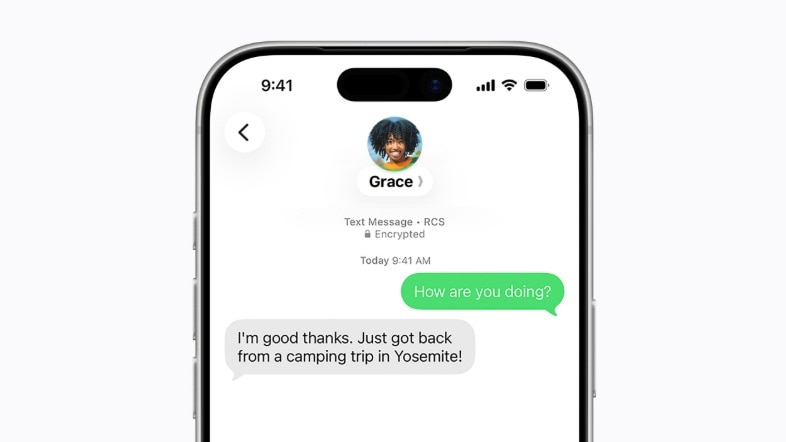
iOS 26.5 Update: Enhanced RCS Encryption for Messaging
iOS 26.5 has been launched by Apple, introducing one of the most substantial upgrades to messaging between iPhone and Android users: end-to-end encrypted RCS chats.
This feature is currently being deployed in beta, ensuring that messages sent between compatible iPhones and Android devices are safeguarded during transmission. Encrypted messages will also be clearly marked, making it simpler for users to recognise secure conversations.
Significance of the New Encryption Feature
Previously, only iMessage conversations among Apple users benefitted from end-to-end encryption. Chats involving iPhone and Android users, even after Apple embraced Rich Communication Services (RCS), lacked comparable protection.
With the introduction of iOS 26.5, Apple is expanding encryption to applicable RCS conversations as well. In addition to heightened security, RCS messaging enables rich features such as higher-quality media sharing, typing indicators, read receipts, and enhanced group chats compared to standard SMS.
Limitations of RCS Encryption Availability
Apple has pointed out that the availability of this feature is contingent on carrier support, the type of Android device in use, and its compatibility with the latest RCS standard. Consequently, not every user may have immediate access to encrypted RCS messaging.
Checking for Encrypted RCS Messaging on iPhone
To activate this feature, users should first ensure their iPhone is updated to iOS 26.5.
Navigate to the Settings app, select General, and tap on Software Update to install the new version. Once the update is complete, go to Settings, open Apps, and under the Text Messaging section, select RCS Messaging.
On the settings page, users can verify if the “End-to-End Encryption (Beta)” option is enabled. Apple mentions that this feature is automatically activated for supported devices and carriers.
Verifying RCS Encryption on Android Devices
Android users should open Google Messages, tap their profile icon, and access Message Settings.
Under the RCS Chats section, they can check whether the “Automatically resend as text” option is activated. Google indicates that users have the option to switch to RCS chats if an encrypted message fails to send.
Apple initially introduced RCS support to iPhones to enhance messaging compatibility with Android devices, replacing traditional SMS for supported conversations. The integration of encryption now aligns these chats more closely with the privacy safeguards already offered through iMessage.