
Apple Intelligence Expands with New AI Features
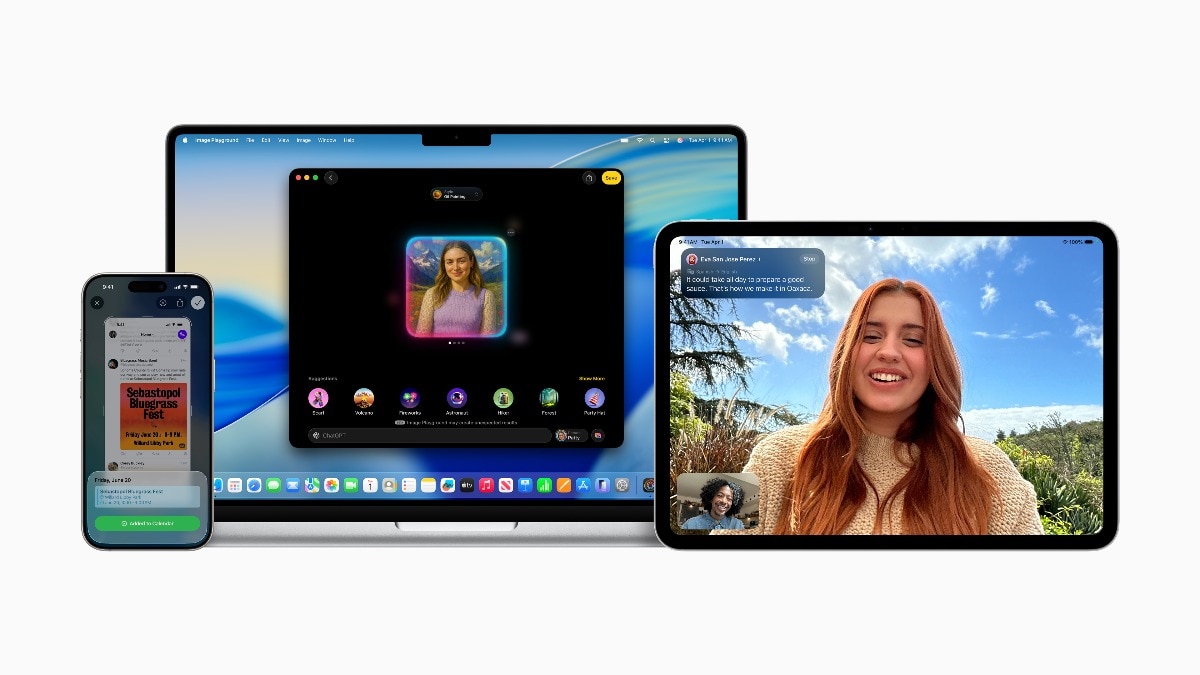
Apple has unveiled an exciting enhancement to Apple Intelligence, its collection of artificial intelligence features integrated across iPhone, iPad, Mac, Apple Watch, and Apple Vision Pro. The latest update introduces capabilities such as Live Translation, visual intelligence to interpret content on screens, more dynamic Genmoji, and custom image generation via Image Playground. Notably, Apple is also granting third-party developers direct access to its on-device foundation model, ensuring swift, private, and offline AI interactions.
Live Translation: Real-Time Multilingual Messaging and Calls
One of the standout features is Live Translation, now embedded within Messages, FaceTime, and Phone. Users can input text or speak in one language, which gets automatically translated in real time, along with voice and captions based on the application in use. This function employs on-device models, thereby maintaining user privacy and operating entirely offline.
Genmoji and Image Playground: Creative AI, Personalised
The updates to Genmoji now allow users to create personalised emojis by blending existing emojis and adding text prompts for further customisation. Adjustments to hairstyles, expressions, and attributes enable Genmoji to mirror friends and family closely. Furthermore, Image Playground introduces features akin to ChatGPT, permitting users to select artistic styles such as vector or oil painting, or to create a unique look using the “Any Style” option.
Importantly, Image Playground will only share data with ChatGPT if explicit permission is granted by users.
Visual Intelligence: Contextual Understanding Across Screens
Apple’s Visual Intelligence extends AI functionality to encompass whatever appears on a user’s display. By simply tapping a button, users can request ChatGPT or Apple Intelligence to recognise products, evaluate visuals, or extract pertinent information like event details from messages and websites. This information can subsequently be transformed into calendar entries, reminders, or online searches through compatible apps like Etsy and Google.
Apple Watch Gets Smarter With Workout Buddy
The Apple Watch introduces Workout Buddy, a real-time motivational assistant driven by user data. This feature assesses fitness history, heart rate, distance, and various metrics to provide tailored, dynamic feedback using voice models from Fitness+ trainers. Workout Buddy operates offline and upholds user privacy, with information processed and stored on the device.
Foundation Models for Developers: Apple’s AI Goes Open
In a groundbreaking initiative, Apple is making the on-device AI model that supports Apple Intelligence accessible to developers. Through the new Foundation Models framework, applications can integrate privacy-focused intelligence without requiring internet access or incurring cloud expenses. Functions like guided generation, tool calling, and natural language understanding can be implemented with as little as three lines of code.
Examples of applications include custom quizzes in educational platforms or voice-controlled functionalities in offline navigation systems.
Shortcuts and Siri: Smarter, More Private
Apple’s Shortcuts app has become even more intelligent with new actions powered by Apple Intelligence. Users can design personalised workflows that leverage on-device AI or opt for Private Cloud Compute. Siri has also been upgraded, enhancing its capability to manage complex inquiries, maintain conversational context, and interact with features such as Writing Tools and ChatGPT.
For instance, a student could compare lecture transcripts with their notes or effortlessly generate summaries using Siri, ensuring data stays entirely on the device.
Everyday Enhancements Across Apple Ecosystem
- Reminders now automatically categorise actions from emails and notes.
- Apple Wallet provides a summary of order tracking from different merchants.
- Messages includes auto-suggested polls and AI-generated backgrounds.
- Mail and Photos offer enhanced summaries and memory creation using natural language.
- Visual intelligence identifies objects via camera or screen and can suggest calendar events.
- The Clean Up feature in Photos removes unwanted elements from images without altering essential content.
- Image Wand refines rough sketches into polished illustrations within Notes.
- Smart Reply, Previews, and Reduce Interruptions Focus enhance notifications and messaging.
Apple’s AI Privacy Strategy: Local First, Cloud Only When Needed
Apple remains committed to prioritising user privacy. The majority of AI operations are performed directly on-device, with Private Cloud Compute used for more intensive tasks only as necessary. The cloud servers, built on Apple Silicon, have open code independently verifiable to ensure transparency.
Languages and Rollout Timeline
Apple Intelligence is set to support eight additional languages by the close of 2025, including Danish, Dutch, Norwegian, Portuguese (Portugal), Swedish, Turkish, Traditional Chinese, and Vietnamese. Currently, supported languages encompass English (various regions), French, German, Italian, Spanish, Japanese, Korean, and Simplified Chinese.
The features are now accessible to developers through the Apple Developer Program and are scheduled for a public beta next month via the Apple Beta Software Program. The complete rollout is anticipated this autumn on all iPhone 16 models, iPhone 15 Pro series, and M1 or newer iPads and Macs, with Siri and system language configured to a supported option.