


“`html
What defines an ideal affordable laptop? For many, it’s about essential features such as impressive battery life, speed, and ease of use. For others, performance takes precedence. The MacBook Neo primarily serves the first group, making it a solid choice unless more demanding specifications are required.
The MacBook Neo has been evaluated for over two weeks to ascertain its target audience. This model excels in many areas and comes with numerous appealing aspects, including a premium design, high build quality, a competitive price of Rs 69,900, and integration within the MacOS ecosystem.
Thus, the indication is clear: Apple has crafted a device that is genuinely appealing. However, is it suitable for everyone? Those intending to use the MacBook Neo for intensive tasks might need to explore other options.
Let us thoroughly investigate whether the MacBook Neo meets its hype and identify ideal users for this laptop.
MacBook Neo Review: Design, Keyboard, and Build Quality
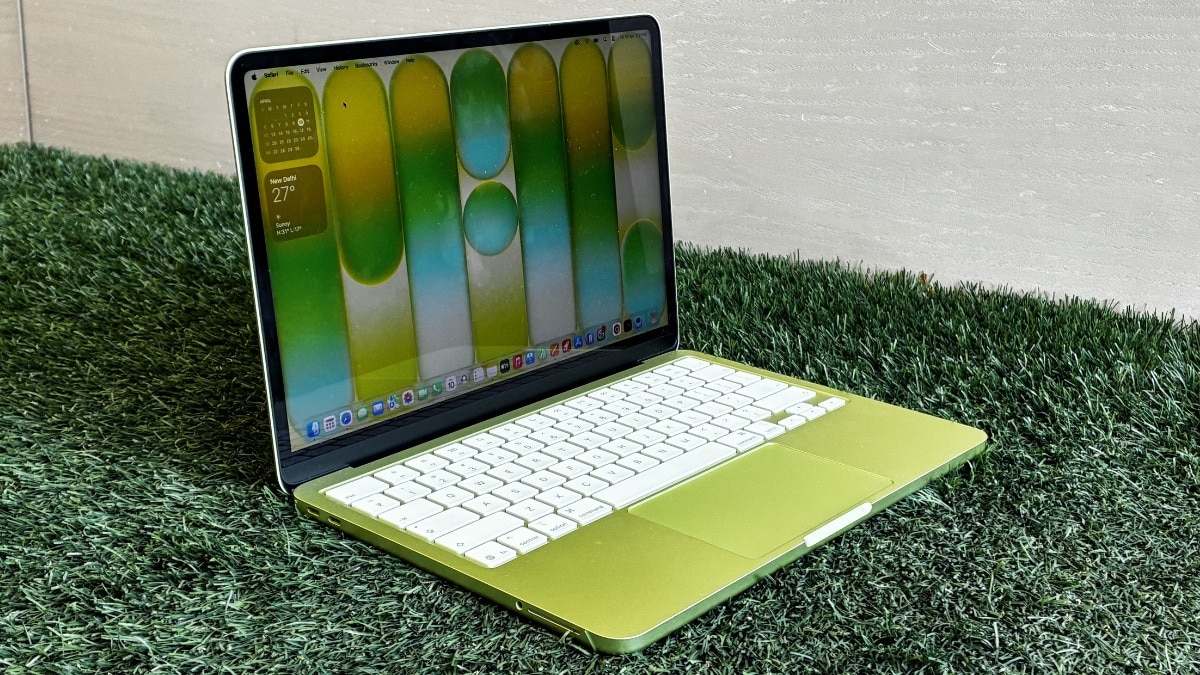
Initially, the MacBook Neo presents a strikingly premium appearance with distinct colour choices, a sleek design, and a butterfly keyboard that is both pleasant and dependable. Apple has refreshed its colour options beyond the traditional silver and black, now offering vibrant shades like Citrus and Pink Blush. Basic colour enthusiasts can still opt for White and Indigo.
This laptop maintains an aluminium chassis within a portable 13-inch frame, although it feels marginally smaller. Weighing in at 1.23 kilograms and measuring slightly over 0.5 inches in thickness, the overall design is thoughtfully executed, from the effortlessly opened lid to the spacious trackpad. The trackpad is notably user-friendly, especially compared to competitors in this price bracket.
To manage costs, the MacBook Neo is equipped with two USB-C ports; the USB-C 3 port offers faster data transfer, while the USB-C 2 operates at a slower speed. This means users must rely on the faster port for demanding tasks such as connecting monitors, external storage, or hubs.
Regarding the webcam, the Neo omits Centre Stage camera functionalities, instead featuring a standard 1080p camera, which is satisfactory but falls short when compared to MacBook Air models. Touch ID is exclusive to the 512GB version and does not come with the base 256GB model. Another limitation is the absence of a backlit keyboard, making usage in low-light conditions challenging.
MacBook Neo Review: Display
The display of the MacBook Neo offers a 13-inch Liquid Retina screen with IPS technology, achieving a native resolution of 2408×1506 and a peak brightness of up to 500 nits.
When it comes to viewing experiences, the MacBook Neo delivers remarkable visuals, despite lacking OLED technology. The colours are vibrant, whites appear clean, and blacks are reasonably deep for an IPS screen, making it ideal for everyday activities like browsing, media consumption, and casual office tasks such as writing or switching between Chrome tabs.
The display stands out above typical expectations at this price point. While it may not feature the most dazzling screen, it consistently provides a pleasant viewing experience. Additionally, the brightness is commendable, working effectively even in direct sunlight. Overall, the MacBook Neo excels in providing robust display features that outshine competitors in the same price category.
MacBook Neo Review: Performance, Software, and Battery Life
To ensure the MacBook Neo remains budget-friendly, Apple has opted for its A18 Pro chip, used in the iPhone 16 Pro launched in 2024, instead of its M-series Silicon. Coupled with 8GB of RAM and storage options up to 512GB, this lightweight chip suits everyday tasks well.
However, the limited RAM can hinder power users from effectively running demanding applications. Those who frequently work with multiple browser tabs, heavy video/photo editing tools, and streaming may experience stretched performance levels.
That said, for average users, the A18 Pro chip performs admirably in real-world scenarios. The MacBook Neo handles routine tasks seamlessly. The majority of tasks were centred around journalistic work, including writing on Google Docs, managing a content management system (CMS), utilising social media applications, and casually editing video content, primarily within Google Chrome.
The standout feature of the Neo is its software: macOS Tahoe, enhanced with a “Liquid Glass” interface that appears superior on screens compared to previous iPhone models. This latest iteration incorporates all of Apple’s AI-driven features, which function more intuitively on a Mac than on Windows devices.
Multitasking on the MacBook Neo is fluid, thanks to features such as Stage Manager, Spotlight Update, and Hot Corners. Additionally, Universal Clipboard facilitates easy transitions for users within the Apple ecosystem, connecting with iPhone or iPad.
Importantly, the MacBook Neo offers outstanding battery longevity, lasting a full work shift of 9 hours on a single charge. Even after this duration, the laptop had approximately 25-30% battery remaining, indicating it can last up to 11-12 hours under medium to heavy usage.
MacBook Neo Verdict: Who Should Buy?
The MacBook Neo emerges as a resourceful choice for average users who value ease of use above raw power. It excels in fundamental aspects, providing a premium design, dependable display, a smooth macOS experience, and remarkable battery longevity, all at an affordable cost.
This laptop is especially suitable for students, writers, and professionals dealing with light to moderate workloads. The A18 Pro chip, while not intended for high-demand tasks, efficiently manages day-to-day activities, ensuring a fluid overall experience.
Nevertheless, potential users should consider the compromises, including limited RAM, the absence of the M-series chip, and missing features like a backlit keyboard or an advanced webcam, which may detract from its allure for power users.
Thus, the message is straightforward. The MacBook Neo is perfectly suited for individuals seeking a straightforward laptop for daily tasks, but those requiring high performance or advanced features may need to explore more powerful alternatives.
[ad_2]
“`