StartupSuperb
Friday, August 7, 2026
No Result
View All Result
  • Login
  • Register
  • NewsLatest
    • Trending
    • International Insights
    • Reports
    • Indian Startup News
  • Funding FlowJust In
  • Artificial Intelligence
  • Tech
  • Marketing
  • Resources
    • Books
  • Shark Tank
    • Shark Tank India
  • Startup Stories
    • Founder Fridays
    • Superb Shepreneurs
StartupSuperb
  • NewsLatest
    • Trending
    • International Insights
    • Reports
    • Indian Startup News
  • Funding FlowJust In
  • Artificial Intelligence
  • Tech
  • Marketing
  • Resources
    • Books
  • Shark Tank
    • Shark Tank India
  • Startup Stories
    • Founder Fridays
    • Superb Shepreneurs
No Result
View All Result
Subscribe
StartupSuperb
  • News
  • Funding Flow
  • Artificial Intelligence
  • Tech
  • Marketing
  • Resources
  • Shark Tank
  • Startup Stories
ADVERTISEMENT

Break Free from Doomscrolling: How Your Android Phone Can Help

Akash Das by Akash Das
May 13, 2026
in Tech
0
Break Free from Doomscrolling: How Your Android Phone Can Help
ADVERTISEMENT


Pause Point: Google’s New Digital Wellbeing Feature in Android 17

Highlights

  • 1 Pause Point: Google’s New Digital Wellbeing Feature in Android 17
    • 1.1 What is Google Pause Point?
    • 1.2 How to Enable Pause Point on Android

Pause Point: Google’s New Digital Wellbeing Feature in Android 17

Pause Point is the latest addition to Google’s Digital Wellbeing initiative with Android 17. This feature aims to diminish smartphone usage by introducing a brief delay before users access certain apps. In contrast to previous tools like screen time reports and app timers that were often overlooked, Pause Point establishes a 10-second gap between an app selection and its opening.

What is Google Pause Point?

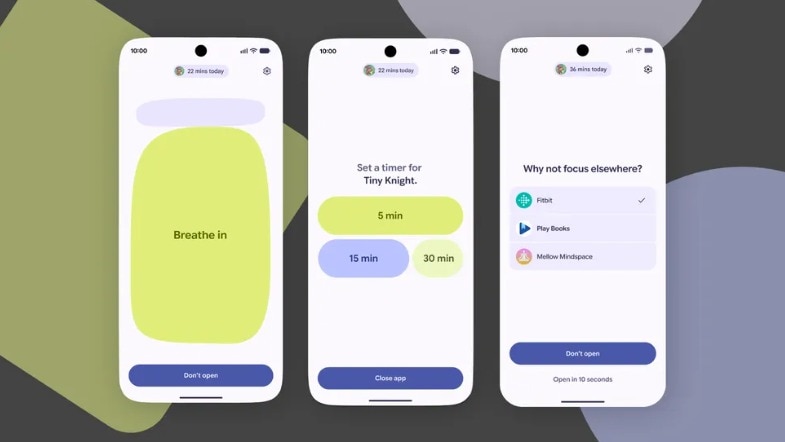
The functionality is straightforward. When a user selects a tempting app, the device does not launch it immediately. Instead, a 10-second notification, dubbed a digital waiting room, appears with the question: “Why am I here?” The goal is not to prevent use but to disrupt the habitual behaviour of tapping and scrolling.

During this interval, users have several options. They can engage in breathwork by following an easy on-screen breathing exercise. They might also set limits by informing the device they wish to remain on the app for only five or ten minutes. Users could view cherished memories via a curated photo collection or be steered towards an alternative activity, such as an audiobook or a read-later piece.

This approach revolves around creating friction rather than imposing restrictions. Unlike conventional timers that can be dismissed at a whim, Pause Point enforces a purposeful delay before granting access.

How to Enable Pause Point on Android

The feature is integrated into the existing Digital Wellbeing suite. To activate it, users must navigate to Settings on their Android devices, select Digital Wellbeing and Parental Controls, and then proceed to choose Pause Point. Currently, this feature is being rolled out for Pixel and Samsung Galaxy devices.

Once activated, users can identify the target apps they wish to slow down, selecting categories such as social media, news, or gaming apps. Additionally, users can choose an intervention style that includes breathing exercises, photos, or an intentional timer, depending on how they prefer the pause screen to operate.

If needed, users can disable the feature during a craving or urge, although this requires a complete device restart. This 30-second barrier is presented as a safeguard to protect long-term objectives from fleeting impulses.


ADVERTISEMENT
Akash Das

Akash Das

Hi, I’m Akash, an entrepreneur, tech enthusiast, digital marketer, and content creator on a mission to inspire innovation and drive transformation through technology and creativity.My expertise extends to digital marketing, where I craft data-driven strategies for SEO, social media, and branding to empower businesses and creators to grow their online presence. Alongside my entrepreneurial journey, I share my insights and discoveries through engaging blogs, tutorials, and YouTube content.

Leave a Reply Cancel reply

Your email address will not be published. Required fields are marked *

ADVERTISEMENT
StartupSuperb

Research-backed Indian startup journalism. Funding rounds, mergers and acquisitions, AI, and technology — every figure checked against primary sources.

Startup News

  • Startup News
  • Startup Funding News
  • Artificial Intelligence News
  • Tech News
  • Mergers & Acquisitions
  • Shark Tank India
  • Startup Marketing
  • International Insights
  • Indian Startup News

Resources

  • Founder Resources
  • Startup Books
  • Startup Reports
  • Tools for Founders

Company

  • About Us
  • Contact Us
  • Advertise
  • Privacy Policy
  • Terms and Conditions
  • About Us
  • Contact Us
  • Advertise
  • Privacy Policy
  • Terms and Conditions

© 2026 StartupSuperb. Research-backed Indian startup news: funding, AI, and technology.

Welcome Back!

Sign In with Google
Sign In with Linked In
OR

Login to your account below

Forgotten Password? Sign Up

Create New Account!

Sign Up with Google
Sign Up with Linked In
OR

Fill the forms below to register

All fields are required. Log In

Retrieve your password

Please enter your username or email address to reset your password.

Log In
No Result
View All Result
  • News
    • Exclusive
    • International Insights
    • Reports
    • Indian Startup News
  • Funding Flow
  • Artificial Intelligence
  • Tech
  • Marketing
  • Insights
  • Resources
    • Books
  • Shark Tank
    • Shark Tank India
  • Startup Stories
    • Founder Fridays
    • Superb Shepreneurs
  • Social Superb

© 2026 StartupSuperb. Research-backed Indian startup news: funding, AI, and technology.

Go to mobile version