
Pause Point: Google’s New Digital Wellbeing Feature in Android 17
Pause Point is the latest addition to Google’s Digital Wellbeing initiative with Android 17. This feature aims to diminish smartphone usage by introducing a brief delay before users access certain apps. In contrast to previous tools like screen time reports and app timers that were often overlooked, Pause Point establishes a 10-second gap between an app selection and its opening.
What is Google Pause Point?
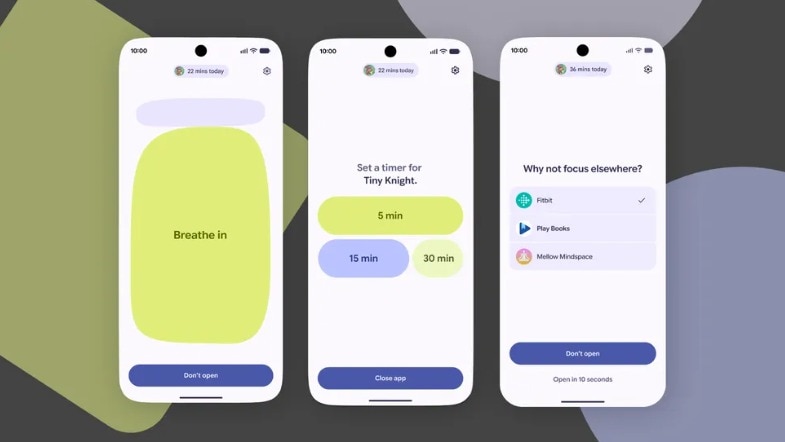
The functionality is straightforward. When a user selects a tempting app, the device does not launch it immediately. Instead, a 10-second notification, dubbed a digital waiting room, appears with the question: “Why am I here?” The goal is not to prevent use but to disrupt the habitual behaviour of tapping and scrolling.
During this interval, users have several options. They can engage in breathwork by following an easy on-screen breathing exercise. They might also set limits by informing the device they wish to remain on the app for only five or ten minutes. Users could view cherished memories via a curated photo collection or be steered towards an alternative activity, such as an audiobook or a read-later piece.
This approach revolves around creating friction rather than imposing restrictions. Unlike conventional timers that can be dismissed at a whim, Pause Point enforces a purposeful delay before granting access.
How to Enable Pause Point on Android
The feature is integrated into the existing Digital Wellbeing suite. To activate it, users must navigate to Settings on their Android devices, select Digital Wellbeing and Parental Controls, and then proceed to choose Pause Point. Currently, this feature is being rolled out for Pixel and Samsung Galaxy devices.
Once activated, users can identify the target apps they wish to slow down, selecting categories such as social media, news, or gaming apps. Additionally, users can choose an intervention style that includes breathing exercises, photos, or an intentional timer, depending on how they prefer the pause screen to operate.
If needed, users can disable the feature during a craving or urge, although this requires a complete device restart. This 30-second barrier is presented as a safeguard to protect long-term objectives from fleeting impulses.