• About Us
  • Contact Us
  • Advertise
  • Privacy Policy
  • Terms and Conditions
Monday, April 20, 2026
  • Login
  • Register
StartupSuperb
  • NewsLatest
    • Trending
    • International Insights
    • Reports
  • Funding FlowJust In
  • Artificial Intelligence
  • Tech
  • Marketing
  • Resources
    • Books
  • Shark Tank
    • Shark Tank India
  • Startup Stories
    • Founder Fridays
    • Superb Shepreneurs
No Result
View All Result
  • NewsLatest
    • Trending
    • International Insights
    • Reports
  • Funding FlowJust In
  • Artificial Intelligence
  • Tech
  • Marketing
  • Resources
    • Books
  • Shark Tank
    • Shark Tank India
  • Startup Stories
    • Founder Fridays
    • Superb Shepreneurs
No Result
View All Result
StartupSuperb
No Result
View All Result
  • News
  • Funding Flow
  • Artificial Intelligence
  • Tech
  • Marketing
  • Insights
  • Resources
  • Shark Tank
  • Startup Stories
  • Social Superb
ADVERTISEMENT
Home Tech

“iOS 26 Glitch Turns Shared Android Photos a Shocking Red”

Akash Das by Akash Das
December 16, 2025
in Tech
Reading Time: 4 mins read
0
A A
0
“iOS 26 Glitch Turns Shared Android Photos a Shocking Red”
ADVERTISEMENT
Share on LinkedInShare on FacebookShare on X.comSend on TelegramSend on WhatsApp


iOS 26 Bug Affects Photos from Android Devices


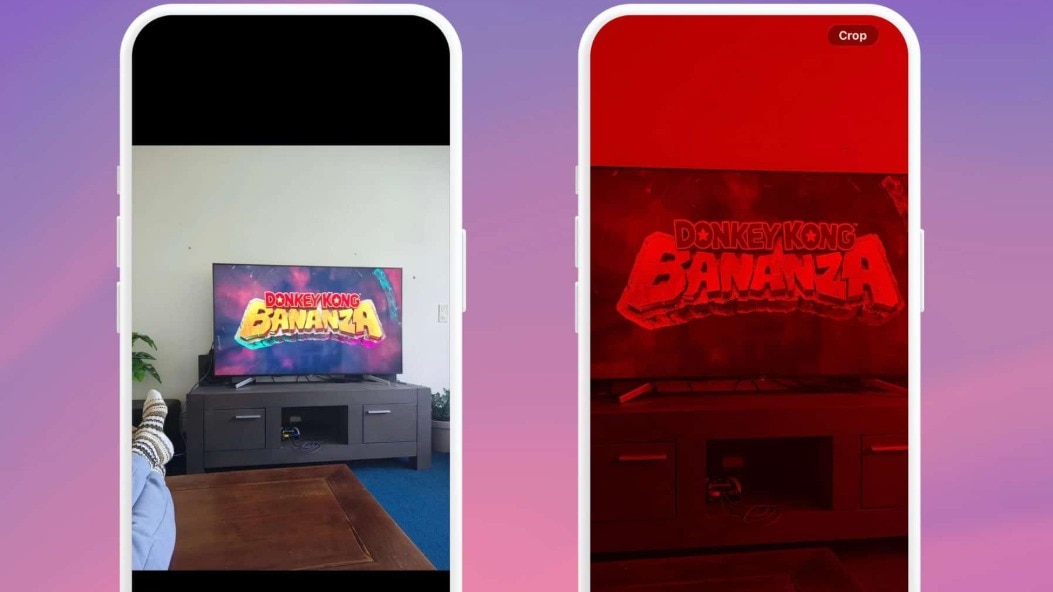
iOS 26 is currently facing criticism due to a unique bug that significantly distorts the colour of photographs transferred from Android devices. Reports from various online platforms, including Reddit, highlight this problem, where an unsettling red tint is seen on specific images within the iPhone’s native Photos application.

Users have reported that the flaw is not evident at first glance. While scrolling through their photo library, they see accurate thumbnails; however, when tapping or zooming in on the image, the unsettling red overlay appears without warning. This has understandably raised alarms among many, who initially suspected that the image files were damaged. Furthermore, attempts to crop these affected images have resulted in instances where the photo unexpectedly shifts to black and white.

The bug mainly influences photographs taken with popular Android smartphones before being transferred to an iPhone. Experts suggest that the issue stems from how iOS 26 interprets embedded colour information or HDR metadata, particularly the gain maps in newer formats like Android’s Ultra HDR, causing a significant imbalance that favours red hues.

Even with the recent iOS 26.2 update installed, the problem remains unresolved, and Apple has yet to acknowledge this peculiar behaviour officially. For those affected, there is a straightforward, albeit irritating, workaround. By opening the problematic photograph, selecting ‘Edit’, and tapping ‘Revert’, users can restore the original colour profile.

While this temporary solution keeps the image data secure, it must be carried out manually for each affected photograph, making it an inconvenient stopgap until Apple introduces a permanent fix. This glitch is part of a broader set of initial issues following the iOS 26 rollout, which also include user complaints about battery drainage and choppy animations.


ADVERTISEMENT
ShareShareTweetShareSend
ADVERTISEMENT
Akash Das

Akash Das

Hi, I’m Akash, an entrepreneur, tech enthusiast, digital marketer, and content creator on a mission to inspire innovation and drive transformation through technology and creativity.My expertise extends to digital marketing, where I craft data-driven strategies for SEO, social media, and branding to empower businesses and creators to grow their online presence. Alongside my entrepreneurial journey, I share my insights and discoveries through engaging blogs, tutorials, and YouTube content.

Related Posts

“Yann LeCun Takes a Stand: Refuting Anthropic CEO’s AI Job Loss Predictions”

“Yann LeCun Takes a Stand: Refuting Anthropic CEO’s AI Job Loss Predictions”

April 19, 2026
0
Disconnect to Rejuvenate: The Mood-Boosting Benefits of Leaving Social Media Behind

Disconnect to Rejuvenate: The Mood-Boosting Benefits of Leaving Social Media Behind

April 19, 2026
0
Unleashing Efficiency: Five Ways Anthropic’s Claude Opus 4.7 Transforms Your Workflow

Unleashing Efficiency: Five Ways Anthropic’s Claude Opus 4.7 Transforms Your Workflow

April 17, 2026
1
Transforming Your Workflow: 3 Innovative Codex Features to Boost Efficiency

Transforming Your Workflow: 3 Innovative Codex Features to Boost Efficiency

April 17, 2026
1
“Reed Hastings Reflects on His Impact as He Bids Farewell to Netflix”

“Reed Hastings Reflects on His Impact as He Bids Farewell to Netflix”

April 17, 2026
0
Gemini’s Nano Banana Revolutionizes Personal Intelligence: A Guide to Getting Started

Gemini’s Nano Banana Revolutionizes Personal Intelligence: A Guide to Getting Started

April 17, 2026
3

Leave a Reply Cancel reply

Your email address will not be published. Required fields are marked *

I agree to the Terms & Conditions and Privacy Policy.

This site uses Akismet to reduce spam. Learn how your comment data is processed.

ADVERTISEMENT
StartupSuperb

©️ All rights reserved startupsuperb

Navigate Site

  • About Us
  • Contact Us
  • Advertise
  • Privacy Policy
  • Terms and Conditions

Follow Us

Welcome Back!

Sign In with Google
Sign In with Linked In
OR

Login to your account below

Forgotten Password? Sign Up

Create New Account!

Sign Up with Google
Sign Up with Linked In
OR

Fill the forms bellow to register

*By registering into our website, you agree to the Terms & Conditions and Privacy Policy.
All fields are required. Log In

Retrieve your password

Please enter your username or email address to reset your password.

Log In
No Result
View All Result
  • News
    • Exclusive
    • International Insights
    • Reports
  • Funding Flow
  • Artificial Intelligence
  • Tech
  • Marketing
  • Insights
  • Resources
    • Books
  • Shark Tank
    • Shark Tank India
  • Startup Stories
    • Founder Fridays
    • Superb Shepreneurs
  • Social Superb

©️ All rights reserved startupsuperb

This website uses cookies. By continuing to use this website you are giving consent to cookies being used. Visit our Privacy and Cookie Policy.
Go to mobile version