• About Us
  • Contact Us
  • Advertise
  • Privacy Policy
  • Terms and Conditions
Monday, March 23, 2026
  • Login
  • Register
StartupSuperb
  • NewsLatest
    • Trending
    • International Insights
    • Reports
  • Funding FlowJust In
  • Artificial Intelligence
  • Tech
  • Marketing
  • Resources
    • Books
  • Shark Tank
    • Shark Tank India
  • Startup Stories
    • Founder Fridays
    • Superb Shepreneurs
No Result
View All Result
  • NewsLatest
    • Trending
    • International Insights
    • Reports
  • Funding FlowJust In
  • Artificial Intelligence
  • Tech
  • Marketing
  • Resources
    • Books
  • Shark Tank
    • Shark Tank India
  • Startup Stories
    • Founder Fridays
    • Superb Shepreneurs
No Result
View All Result
StartupSuperb
No Result
View All Result
  • News
  • Funding Flow
  • Artificial Intelligence
  • Tech
  • Marketing
  • Insights
  • Resources
  • Shark Tank
  • Startup Stories
  • Social Superb
ADVERTISEMENT
Home Tech

Samsung Introduces AirDrop-Like Feature to Quick Share with Galaxy S26 Series

Akash Das by Akash Das
March 23, 2026
in Tech
Reading Time: 4 mins read
0
A A
0
Samsung Introduces AirDrop-Like Feature to Quick Share with Galaxy S26 Series
ADVERTISEMENT
Share on LinkedInShare on FacebookShare on X.comSend on TelegramSend on WhatsApp
ADVERTISEMENT


AirDrop Support Rollout for Galaxy S26 Series


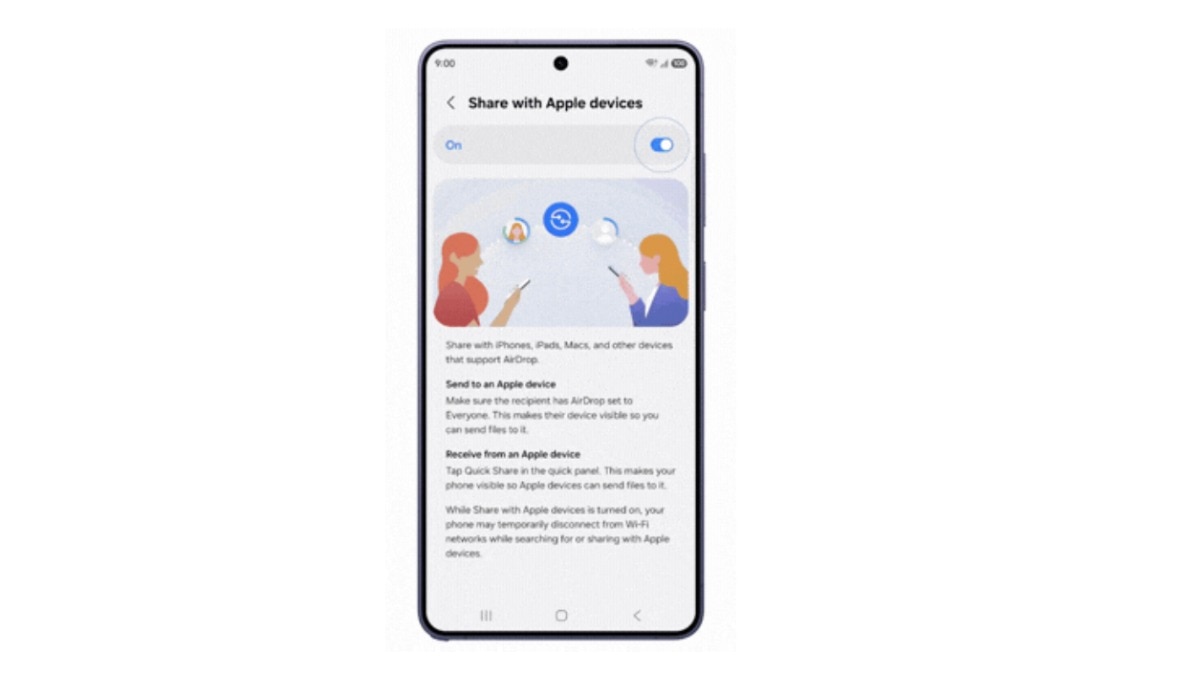
AirDrop support is now being introduced for Quick Share on the Galaxy S26 series by Samsung. With this new feature, users of the Galaxy S26, S26+, and S26 Ultra can easily send and receive files directly to and from iPhones, iPads, and Macs, starting from March 23.

The update will commence in South Korea and gradually reach the US later this week, followed by countries including Europe, Hong Kong, Japan, Latin America, Southeast Asia, and Taiwan.

How Does AirDrop Support in Quick Share Function?

For a long time, transferring files between a Samsung device and an iPhone has been a cumbersome process, often requiring third-party applications, Bluetooth workarounds, or even email.

Apple’s built-in AirDrop feature has facilitated file sharing within the iOS ecosystem but was not reachable for Android devices. Finally, this barrier has been removed for users of the Galaxy S26 series.

Users will now be able to transfer files between their Galaxy phones and Apple devices effortlessly, thanks to AirDrop support. Furthermore, file transfers occur directly between devices without the need for an internet connection.

To initiate the process, users should access the Settings app on their Galaxy S26 device, navigate to Connected devices, and click on Quick Share. They should then enable the “Share with Apple devices” toggle.

For recipients using iPhones, it is necessary for them to set their AirDrop settings to “Everyone for 10 minutes.” Once the device shows up on the nearby radar, the sender can select it and proceed with the transfer.

Samsung has specified that AirDrop support will initially be made available exclusively to users of the Galaxy S26 series. The company also intends to broaden this support to additional devices, with announcements expected later in the year.

Additionally, Oppo has disclosed that it will soon roll out AirDrop support for the Find X9 series via Quick Share, indicating that this feature will not remain exclusive to Samsung.


ShareShareTweetShareSend
ADVERTISEMENT
Akash Das

Akash Das

Hi, I’m Akash, an entrepreneur, tech enthusiast, digital marketer, and content creator on a mission to inspire innovation and drive transformation through technology and creativity.My expertise extends to digital marketing, where I craft data-driven strategies for SEO, social media, and branding to empower businesses and creators to grow their online presence. Alongside my entrepreneurial journey, I share my insights and discoveries through engaging blogs, tutorials, and YouTube content.

Related Posts

Apple’s Upcoming Game-Changers: Three Major Announcements Before March 2026

Apple’s Upcoming Game-Changers: Three Major Announcements Before March 2026

March 23, 2026
1
Mark Zuckerberg Develops AI-Based CEO Assistant to Revolutionize Leadership Tasks

Mark Zuckerberg Develops AI-Based CEO Assistant to Revolutionize Leadership Tasks

March 23, 2026
8
Unlocking WhatsApp’s Username Feature: Message Freely Without Sharing Your Number!

Unlocking WhatsApp’s Username Feature: Message Freely Without Sharing Your Number!

March 21, 2026
8
Amazon Set to Revisit Smartphone Market After Over a Decade of Fire Phone Missteps

Amazon Set to Revisit Smartphone Market After Over a Decade of Fire Phone Missteps

March 20, 2026
3
Flipkart CFO Sriram Venkataraman Resigns as IPO Ambitions Heat Up

Flipkart CFO Sriram Venkataraman Resigns as IPO Ambitions Heat Up

March 20, 2026
1
Valour Unveils the 1R Smartwatch with AI Coaching at an Introductory Price of Rs 4,499

Valour Unveils the 1R Smartwatch with AI Coaching at an Introductory Price of Rs 4,499

March 20, 2026
7

Leave a Reply Cancel reply

Your email address will not be published. Required fields are marked *

I agree to the Terms & Conditions and Privacy Policy.

This site uses Akismet to reduce spam. Learn how your comment data is processed.

ADVERTISEMENT
StartupSuperb

©️ All rights reserved startupsuperb

Navigate Site

  • About Us
  • Contact Us
  • Advertise
  • Privacy Policy
  • Terms and Conditions

Follow Us

Welcome Back!

Sign In with Google
Sign In with Linked In
OR

Login to your account below

Forgotten Password? Sign Up

Create New Account!

Sign Up with Google
Sign Up with Linked In
OR

Fill the forms bellow to register

*By registering into our website, you agree to the Terms & Conditions and Privacy Policy.
All fields are required. Log In

Retrieve your password

Please enter your username or email address to reset your password.

Log In
No Result
View All Result
  • News
    • Exclusive
    • International Insights
    • Reports
  • Funding Flow
  • Artificial Intelligence
  • Tech
  • Marketing
  • Insights
  • Resources
    • Books
  • Shark Tank
    • Shark Tank India
  • Startup Stories
    • Founder Fridays
    • Superb Shepreneurs
  • Social Superb

©️ All rights reserved startupsuperb

This website uses cookies. By continuing to use this website you are giving consent to cookies being used. Visit our Privacy and Cookie Policy.
Go to mobile version